The Zakeke REST API uses the OAuth 2.0 protocol to authorize calls. OAuth is an open standard that many companies use to provide secure access to protected resources.
To have permission to execute an api call you must first contact an authentication server and obtain an authorization token (also called access token) and then use the authorization token in all the subsequent api calls. So to make a sequence of API calls you have to follow the following steps:
Upon account creation, Zakeke automatically generates the necessary API keys required for the authentication and to get an access token. Users have the flexibility to create new API keys at any time, which can be done by accessing the dedicated section in the Zakeke back-office as better explained in the get Access Token section. This functionality also allows for the disabling of previous keys, thereby ensuring enhanced security and control over access to the user's account data.
In Zakeke, an API Key is a set of OAuth client ID and secret credentials for your Merchant Web Site for live environment. In order to authorize your subsequent API calls, you have to pass these credentials in the Authorization header in a POST Access Token request (or alternatively directly in the body of the request).
In exchange for these credentials, the Zakeke authorization server issues access tokens called bearer tokens that you use for authorization when you make REST API requests. A bearer token enables you to complete actions on behalf of, and with the approval of, the resource owner.
The Access-Token field in the get access token response contains a bearer token, indicated by the token_type of Bearer:
1{
2  "access-token": "Your-Access-Token",
3  "token_type": "Bearer",
4  "expires_in": 32398
5}
Include this bearer token in all subsequent requests in the Authorization header with the Bearer authentication scheme.
This sample request uses a bearer token to get a specific design created by a customer:
1curl -v -X GET https:/api.zakeke.com/v1/designs/000-2p5ysDc6d0mC6FQXL0BHXA \
2-H "Content-Type:application/json" \
3-H "Authorization: Bearer <Access-Token>"
Access tokens have a finite lifetime. The expires_in field in the get Access Token response indicates the lifetime, in seconds, of the access token. For example, an expiry value of 3600 indicates that the access token expires in one hour from the time the response was generated.
To detect when an access token expires, write code to either:
Before you create another token, re-use the access token until it expires.
Token Security Best Practice Important: For security reasons, authentication tokens should be generated fresh for each session or API call sequence rather than being stored for extended periods. While tokens can be reused until expiration for performance optimization, avoid long-term storage of tokens in databases, configuration files, or client-side storage. Always generate tokens on-demand when needed to minimize security risks.
:## 2. Get an Access Token
To obtain an access token use the following endpoint:
The POST call requires some parameters to be passed, including OAuth credentials (API keys). "x-www-form-urlencoded" is the protocol that was chosen for passing the parameters to the POST request.
The "x-www-form-urlencoded" format is used to encode and transmit data as part of an HTTP request, typically during a POST method. This format serializes data into a string of key-value pairs, where each pair is separated by an ampersand (&), and keys are separated from values by equals signs (=). Before serialization, keys and values are percent-encoded to ensure compatibility with URL standards, converting spaces to + or %20 and special characters to % followed by their ASCII hexadecimal code.
Setting the "Content-Type" header to "application/x-www-form-urlencoded" in the HTTP request is crucial, as it signals the server to parse the incoming request body according to this encoding scheme.
The following are the parameters that Zakeke requires to obtain an authorization token: Zakeke supports the OAuth 2.0 standard and, as required by that standard, the "client_id" and "client_secret" can alternatively and preferably be submitted using the "Authorization" header with Basic authentication. In this method, the client_id and client_secret are concatenated with a colon (:), base64-encoded, and prepended with the keyword Basic. This string is then included in the request's "Authorization" header.
Security Best Practice: It is strongly recommended to use HTTP Basic Authentication for transmitting client_id and client_secret when making OAuth 2.0 Client Credentials grant requests. This method involves encoding the credentials in Base64 and sending them in the Authorization header, providing a higher level of security compared to including them directly in the request body with application/x-www-form-urlencoded. Direct inclusion in the request body should be avoided unless absolutely necessary and only in secure contexts.
In response, the Zakeke authorization server issues an access token in a JSON object with the following structure:
Re-use the access token until it expires. When it expires, you can get a new token.
IMPORTANT: The API call for obtaining an OAuth 2.0 token using Client Credentials should be performed strictly in server-to-server contexts. This approach ensures that client_id and client_secret are not exposed to clients or transmitted over less secure channels. Implementing this call from client-side applications or exposing sensitive credentials to the public can lead to serious security vulnerabilities. Always ensure that such API calls and the handling of credentials are securely managed within server-side environments.
The authorization token obtained is by default of type C2S, indicating that it can be used for client-to-server calls. This type of token is usually used for API calls involving the Zakeke UI integration process. Where specified, Zakeke APIs may request a token created specifically for server to server use. In this case, the POST call to obtain the token must specify the type of use. See the appropriate section for all the details.
When to use C2S tokens
Use C2S (Client-to-Server) tokens when integrating the Zakeke UI components on the frontend, specifically:
These tokens are designed to be used in client-side code (browser) to communicate with Zakeke services. The C2S token should be generated server-side and then passed to the frontend for use in the Zakeke integration.
To begin using using Zakeke API, follow these steps:
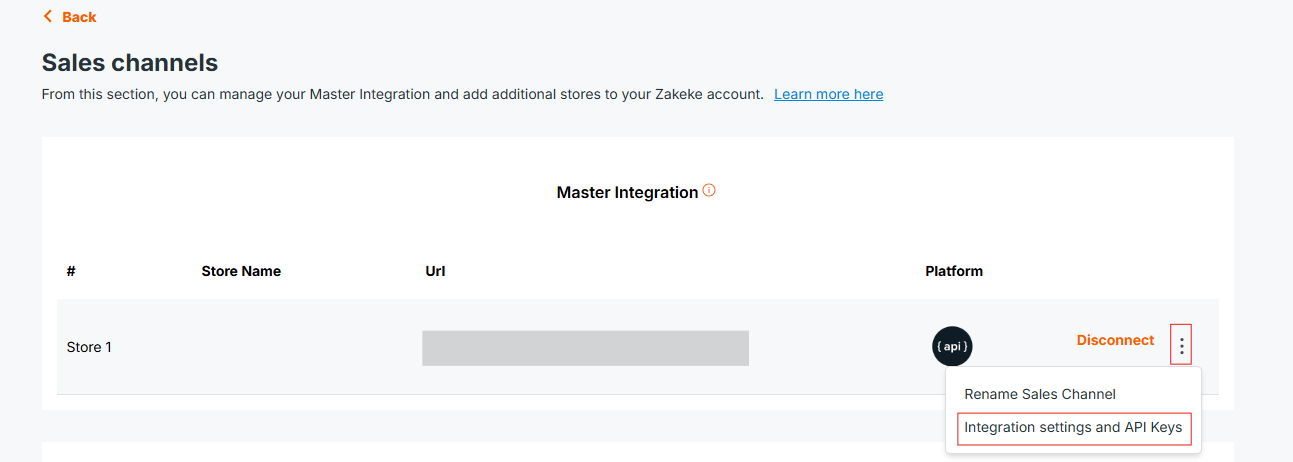
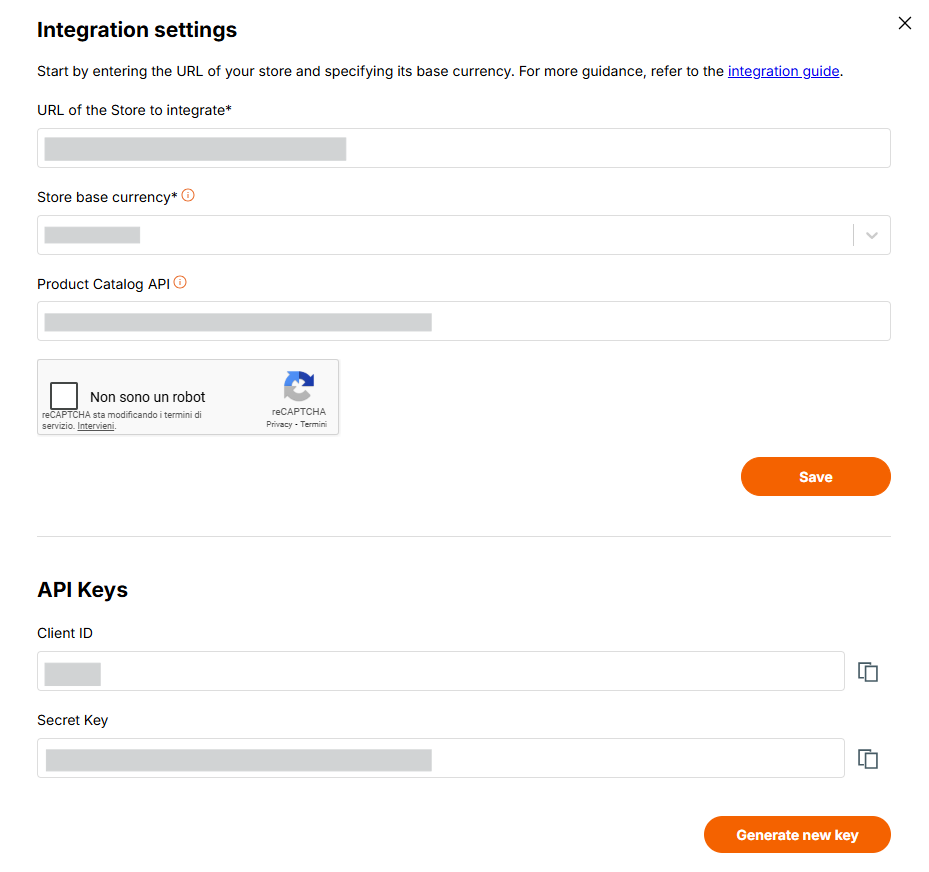
To get an access token using the "x-www-form-urlencoded" protocol:
1curl -X POST https://api.zakeke.com/token \
2     -H "Accept: application/json" \
3     -H "Content-Type: application/x-www-form-urlencoded" \
4     -u "<your_client_id>:<your_secret_key>" \
5     -d "grant_type=client_credentials"
6
To get an access token using the Basic Authentication protocol (recommended):
1curl -X POST https://api.zakeke.com/token \
2     -H "Authorization: Basic <base64(client_id:client_secret)>" \
3     -H "Content-Type: application/x-www-form-urlencoded" \
4     -d "grant_type=client_credentials"
https://api.zakeke.com/tokengrant_type = client_credentialsTo get the access token using "x-www-form-urlencoded":
1using System;
2using System.Net.Http;
3using System.Threading.Tasks;
4
5class Program
6{
7    static async Task Main()
8    {
9        var client = new HttpClient();
10        var request = new HttpRequestMessage(HttpMethod.Post, "https://api.zakeke.com/token")
11        {
12            Content = new FormUrlEncodedContent(new[]
13            {
14                new KeyValuePair<string, string>("grant_type", "client_credentials")
15            })
16        };
17
18        request.Headers.Add("Authorization", "Basic <base64(client_id:client_secret)>");
19
20        var response = await client.SendAsync(request);
21        var responseContent = await response.Content.ReadAsStringAsync();
22
23        Console.WriteLine(responseContent);
24    }
25}
26
Using the native Fetch API (Node.js v18+):
1const fetch = require('node-fetch');
2
3const clientId = '<your_client_id>';
4const clientSecret = '<your_secret_key>';
5const credentials = Buffer.from(`${clientId}:${clientSecret}`).toString('base64');
6
7const params = new URLSearchParams();
8params.append('grant_type', 'client_credentials');
9
10fetch('https://api.zakeke.com/token', {
11    method: 'POST',
12    headers: {
13        'Authorization': `Basic ${credentials}`,
14        'Content-Type': 'application/x-www-form-urlencoded'
15    },
16    body: params
17})
18.then(response => response.json())
19.then(data => console.log(data))
20.catch(error => console.error('Error:', error));
21
For Server to Server (S2S) requests to the various endpoints, the authorization OAuth token must be of type S2S.
The way to get an authentication OAuth token S2S is the same as the normal request, except that, in addition to OAuth credentials, you must send the parameter access_type set to S2S mode:
From the command line, run this command:
1curl -X POST https://api.zakeke.com/token \
2     -H "Accept: application/json" \
3     -H "Content-Type: application/x-www-form-urlencoded" \
4     -u "your_client_id:your_secret_key" \
5     -d "grant_type=client_credentials" \
6     -d "access_type=S2S"
7
Some endpoints (e.g., order checkout on Zakeke: https://api.version.com/v2/order) require an authentication token with, in addition to your OAuth credentials, the identifier of the visitor user or the user who logged in.
One or both of the following parameters must be passed in the body of the request to obtain the token:
| Parameter | Description |
|---|---|
| visitorcode | Identifier of visitor who is browsing on your store. |
| customercode | Identifier of user who is logged on your store. |
Let's better explain the difference between visitorcode and customercode and why they are necessary.
visitorcode is an alphanumeric code that can uniquely identify an unauthenticated user (i.e., one who has not logged in) on the ecommerce site.customercode, on the other hand, is an alphanumeric code that uniquely identifies a user who is registered in the e-commerce site and has logged in.
Zakeke uses these identifiers to assign ownership of uploaded or user-generated assets. For example, when a user uploads an image, that image will be marked as owned by the user by assigning the visitorcode or customercode, making it accessible among their uploaded images in subsequent customizations. When a user saves a design or customization for future use, it will be marked as owned by the user. Furthermore, when an order is registered, the order must be assigned to either a visitor or a customer.From the command line, run this command:
1curl -X POST https://api.zakeke.com/token \
2     -H "Accept: application/json" \
3     -H "Content-Type: application/x-www-form-urlencoded" \
4     -u "your_client_id:your_secret_key" \
5     -d "grant_type=client_credentials" \
6     -d "access_type=S2S" \
7     -d "visitorcode=<VISITOR_CODE>" \
8     -d "customercode=<CUSTOMER_CODE>"
9
The following C# code illustrates how to obtain an authorization token of type S2S with a visitorcode:
1using System;
2using System.Net.Http;
3using System.Net.Http.Headers;
4using System.Text;
5using System.Threading.Tasks;
6
7class Program
8{
9    static async Task Main()
10    {
11        using (var client = new HttpClient())
12        {
13            string endpoint = "https://api.zakeke.com/token";
14
15            var clientId = "<your_client_id>";
16            var clientSecret = "<your_secret_key>";
17
18            var bytes = Encoding.ASCII.GetBytes($"{clientId}:{clientSecret}");
19
20            var credentials = Convert.ToBase64String(bytes);
21
22            client.DefaultRequestHeaders.Authorization =
23                new AuthenticationHeaderValue("Basic", credentials);
24
25            var requestContent = new FormUrlEncodedContent(new[]
26            {
27                new KeyValuePair<string, string>("grant_type", "client_credentials"),
28                new KeyValuePair<string, string>("access_type", "S2S"),
29                new KeyValuePair<string, string>("visitorcode", "<visitor_code>")
30            });
31
32            HttpResponseMessage response = await client.PostAsync(endpoint, requestContent);
33            string responseContent = await response.Content.ReadAsStringAsync();
34            Console.WriteLine(responseContent);
35        }
36    }
37}
38
The following JavaScript code illustrates how to obtain an authorization token of type S2S with a customercode:
1const url = 'https://api.zakeke.com/token';
2const clientId = '<your_client_id>';
3const clientSecret = '<your_client_secret>';
4const credentials = Buffer.from(`${clientId}:${clientSecret}`).toString('base64');
5
6const params = new URLSearchParams();
7
8params.append('grant_type', 'client_credentials');
9params.append('access_type', 'S2S');
10params.append('customercode', '<customer_code>');
11
12fetch(url, {
13    method: 'POST',
14    headers: {
15        'Accept': 'application/json',
16        'Accept-Language': 'en-US',
17        'Content-Type': 'application/x-www-form-urlencoded',
18        'Authorization': `Basic ${credentials}`
19    },
20    body: params
21})
22.then(response => response.json())
23.then(data => console.log(data))
24.catch(error => console.error('Error:', error));